Introduction
In the previous article, we set up a local Kubernetes cluster, installed Istio, the rate limit, and the light service, and implemented the simplest rate limiting scenario. In real world environments, a cluster may run dozens or even hundreds of services. Each of them needs its own api rate limit configuration.
In this article, we will look at how to define separate rate limit configuration for different services. To route traffic to specific services, we will rely on path-based routing.
Theory
Every client request first goes to the ingress gateway - 1.
For each service, we define a VirtualService configuration that describes how requests with a specific path prefix should be routed:
- If the request path starts with
/light, it is routed to thelightservice - 2 - If the request path starts with
/dark, it is routed to thedarkservice - 3
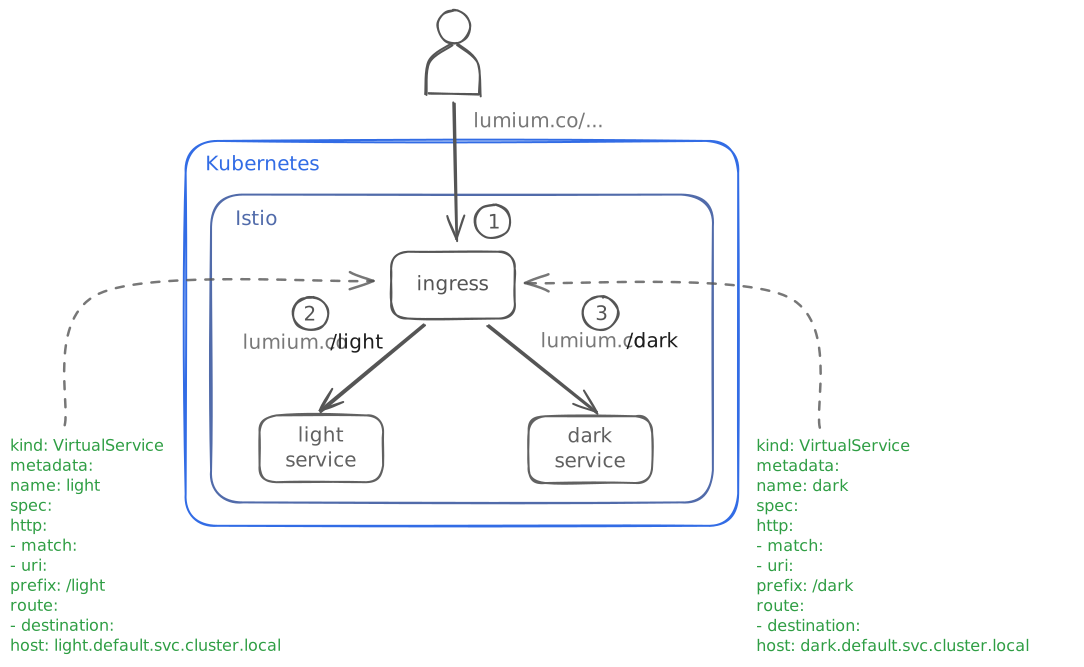
To apply rate limits independently for each service, we create a ConfigMap that specifies the path prefix and the corresponding request limit.
The ingress gateway 1 extracts the path from the request and passes it to the rate limit service, which checks whether the limit has been reached 2.

1. Install the Dark Service
Let’s install the dark service.
It is simple Java application that exposes a single REST endpoint:
GET /dark
We deploy this service using a common Helm chart.
helm install dark lumiumco/service -f https://raw.githubusercontent.com/lumiumco/dark/refs/heads/main/values.yaml
After a short while, you can verify that dark service running:
kubectl get pods -l app.kubernetes.io/name=dark
Expected output:
NAME                    READY   STATUS    RESTARTS   AGE
dark-5c746f9477-jb9cf   2/2     Running   0          1m
Now we can test the endpoint. Run the following command:
curl http://localhost/dark/public
You should see the result:
{"type":"public","client":"n/a","result":"Dark result (public)","company":"n/a"}
Now we have two services light and dark, each of which handles client requests with a specific path.
2. Apply Different Rate Limiting Configurations to Our Services
In the previous part, we already created a ConfigMap for the light service, so first we will remove it.
Run the following command:
kubectl delete cm ratelimit-config -n istio-system
You should see the result:
configmap "ratelimit-config" deleted from istio-system namespace
For each service, we have prepared its own ConfigMap.
For the light service, we kept the same limit: 3 requests per minute.
For the dark service, we set a limit of 1 request per minute.
Apply configuration for light service:
kubectl apply -f https://raw.githubusercontent.com/lumiumco/ratelimit-configs/refs/heads/main/multiple-services/light-ratelimit-config.yaml
And apply configuration for dark service:
kubectl apply -f https://raw.githubusercontent.com/lumiumco/ratelimit-configs/refs/heads/main/multiple-services/dark-ratelimit-config.yaml
Now we need to let the ratelimit service know that it should apply these configurations.
To do this, we need to add them to the ratelimit service deployment.
We have prepared a patch file that updates ratelimit deployment accordingly.
All we need to do is run the following command:
helm upgrade --install ratelimit lumiumco/ratelimit -n istio-system -f https://raw.githubusercontent.com/lumiumco/ratelimit-configs/refs/heads/main/multiple-services/ratelimit-extra-values.yaml
3. Verify Rate Limits
To verify that different limits apply to different services, let’s first send several requests to the light service.
for i in {1..6}; do curl -s -o /dev/null -w "%{http_code}\n" http://localhost/light/public; done
As expected, after three requests, we receive a 429 response, indicating that the limit is in effect.
200
200
200
429
429
429
Let’s repeat the requests for the dark service.
for i in {1..6}; do curl -s -o /dev/null -w "%{http_code}\n" http://localhost/dark/public; done
We see that after the first request, we receive a 429 response.
200
429
429
429
429
429